Friday, 29 April 2016

AS2 - Task Five

Final Outcome


After weeks of filming and editing I am glad to say here is my final piece of the music video and I am proud on what I have produced.


AS2 - Task Four

Costumes and Props


Character Name: Cieron

Costume:

Smart dress code


Props:
Sport equipment
Car
Character Name: Emmanuel

Costume:

Smart dress code


Props:
Sports equipment


Proposal
Prepared by
Cieron, Stephen, Emmanuel

In this task we will be creating a music video, the song that we will be doing as part of this music video is a song by Austin Mahone, this song is called “say somethin”

We will be recording mainly on the Robert Clack leisure centre and Robert Clack upper school and we will be getting in as many people as we can to help with recording


Risk Assessment
Group Members:     Stephen, Cieron, Emmanuel                                                                                Location:
Hazard
Person(s) at Risk
Likelihood of Hazard
1 – Extremely Unlikely
5 – Extremely Likely
Severity of Hazard Outcomes
1 – Very Low Risk
5 – Very High Risk
Risk Level
(Likelihood + Severity)
2
Measures to Take to Manage Risk
Risk Managed?
Y/N
Falling over
Camera man
2
1
3
Take slow, small steps to ensure they do not fall over
Y
Run over by a car
Recording crew
1
2
3
Keep a respectable distance from the car

Make sure someone who drives is behind the wheel of the car
Y

Contacts
Emergency Service:    999
Robert Clack School:
   020 8270 4222
Other Contacts:           


Production schedule

Programme title: Music Video- Say somethin (Ausin Mahone)
Writer: Austin Mahone
Name/role:

Cieron: Singer
Emmanuel: Actor
Stephen: Director/camera man


Location Visit Sheet

Programme Title: Say somethin- Music video
Client:
Writer: Austin Mahone
Producer: Stephen, Cieron, Emmanuel
Director: Stephen
Date:


Rough Sketch/Explanation of location and key points to note
Robert Clack Upper school


Access to location via:
Gosfield road


Name and number of location contact:
Robert Clack Upper School- 020 8270 4200

 Health and Safety Issues to note:

      Slippery floor
      People falling over
      Been hit by a car
Potential Filming Problems :

      Bad weather
      Not been able to get actors/actresses
      Locations unavailable
      Actors/actresses ill

Additional Notes:  (map of area/weather forecast etc)


Production Budget

Item
Cost
Canon XA10 camera
Manfronto monopod
Velbon basic tripod
Sandisk 16gb extreme pro SD card
Costumes
Travel expenses
£220 for 4 days
£1 for 1 day
£24 for 4 days
£16 for 4 days
£30
£10

Total Production Budget:

£301


Shot List
Scene
Shot Number
Description
1
2
3
4
5
6
7
8

9
10
11
12
13
14
15
16
17
18
19
20
21
22
23
24
25
26
27
28
29
30
31
32
33
34
35
36
37
38
39
40
41
42
43
44
1
2
3
4
5
6
7
8

9
10
11
12

13
14
15
16
17
18
19
20
21
22
23
24
25
26
27

28
29
30

31
32
33
34
35
36

37

38
39
40
41
42
43
44
Mid shot of playing basketball
Mid shot of girl walking past
Close up of looking at girl go past
Mid shot of friend pushing singer over
Mid-long shot of girl walking away
Close up of door opening
Mid shot of playing game
Mid-close up of singer singing to the camera
Mid to close-Camera follows
Mid- to close- singing, camera follows
Mid shot- cut scene of playing a game
Mid-long- sings to camera, camera follows
Mid-long, still follow singer
Long shot of singer leaving
Mid to long of singer leaving gate
Close up- singer bumps into girl
Close up of singer smiling
Close up of girl smiling
Mid shot, singing inside the singers car
Long shot- still singing
Over the shoulder shot of girl working
Close up from behind- back to car
Mid to long shot of singer driving
Close-mid shot, sitting on the front of the car
Mid shot- tries to open 6 form door
Mid shot- singer opens door
Mid shot- girls falls through door, singer catches her
Close up- both smile at each other
Mid shot- walks girl to class
mid to close up- teacher calls up the singer in front of class
Mid- starts to sing to the camera
Mid to long- sings with friends
Mid to close- still singing
Close- still singing
Mid- singer and girl alone
Mid- mini party with gathering of friends
Mid to close- singer and girl looks at each other
Close- start singing
Mid - everybody dancing
Mid- singer having mini dance of
Close- people enjoying party
Long- dance off while singing
long - still dancing
Mid to long- singer and girl drives away

AS2 - Task Three

Analysing Our Song


As you can see in the video above it shows the song that we have chosen as a group, this song is called Say Somethin by Austin Mahone.
There are many reasons to why we have chosen this song, but our main reasons for choosing this song is that we knew it was going to work well when it came to getting some ideas together. As well as this we played the song to a few of our colleagues at once they listened to it once it was in their head for the rest of the day meaning that this is a catchy song.

When it comes to knowing about the song, it took us a while to get an idea on what the song is about. As a group we came to the decision that the songs was about the male singer and a girl that he likes, they are both shy to talk to one another throughout the music video so he made the song called 'Say Somethin' for them both. In the actual music video there is a storyline towards it all, it all starts off in the classroom with the singer with his friends having a great time in class, the bell goes and he leaves his classroom and walks down the corridor where he meets this girl he has been dreaming to meet, as the days go on he starts to get closer with her and as a happy ending and they become the dream couple. All of the verses are different but they have a similar meaning to them whilst the chorus is the same the whole way through.

AS2 - Task Two

Analysing Austin Mahone


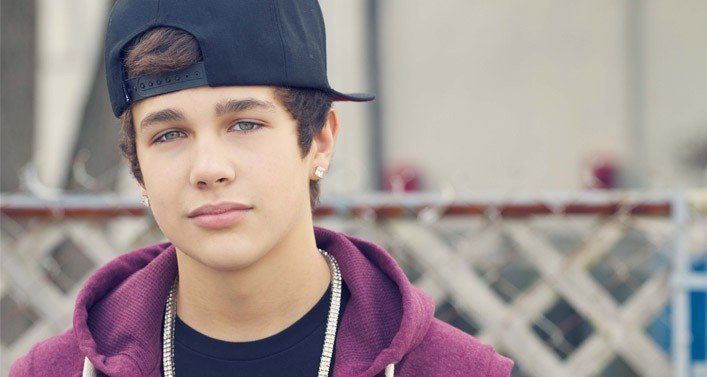
In the image above shows the artist known as Austin Mahone who was born on April 4th 1996, as a singer you will need to see on who your audience will be. With Mahone it seems to be that his audience are teenagers from the age of 12 - 19 years of age. The good thing about this is that the artist is very young himself meaning that he will understand the younger generation on what types of songs they like and will listen to, when choosing this song it did not have many views on YouTube and till this day it has 63 million views which shows it is a very good song and he understands what the public want.
The genre of this music is pop and the subgenre would be music, the artist seems to look after himself by wearing named clothing brands and likes to keep up with the fashion. A reason for this could simply be his age seeing as he is still young.

AS2 - Task One

Choosing our song and getting permission from the artist


Before we started to film and plan out our music video, we had to gain permission in order to use the music seeing as it is not owned by us. If you were to use this music without any permission you can get into serious trouble and end up owing lots of money to the user. In our case we were granted permission and planned out everything as soon as we could. Any songs are most likely to be copyrighted, seeing as we gained access to use the song our copyright strike will be revoked and will not be a big issue.

Once we were gained access to the song we had to choose the right track from a music website, we decided to choose YouTube seeing as there are billions of videos on there already and we were guaranteed to find the one. In the end we decided to choose the lyric version as the song did not have any background noise unlike the official music video which gave us an opportunity to add in little extras that we wish to use, an example of this can be the use of an echo in the hall rather than students voices.

To conclude, we decided to choose this track as a group because we knew that it is very catchy and a lot of people would like this song. Whilst we was listening to this song we had an idea on what it was about and so many ideas running through our head meaning that we knew this was the one for us!


Monday, 8 February 2016

Task Five - Understanding the Techniques of Music Videos - “Elton John and Kiki Dee".


Here we have a video of our practice run at creating a short music video, the song that we used was by Elton John and Kiki Dee and the song is called 'Don't go breaking my heart'.
During this time we had two main characters playing the roll of Elton and Kiki whilst implementing different shots from low to high angle and different positions, we also added in background singers and using this shot we used a dolly cam to make the movement look smooth as possible. This was all done using one director and one camera person in order to make this all work perfectly.

Once all of the footage was recorded and saved on to the computer we then opened up our editing software (Adobe Premier PRO) and loaded all the relevant clips on to the timeline, we then added the music and used the two little screens and markers to get the syncing done properly, we then changed the camera angles by using different clips but we kept all of the clips on their using a layering technique so that it makes it easier to edit and get a better variety of camera angles.

The video above shows our final product yet there can be a lot of improvements done to the video.

Friday, 5 February 2016

Task Four - Understanding the Techniques of Music Videos – “The Pretender”

For this piece of work I created a short storyboard from a small section of the song 'The Pretender' by The Foo Fighters, for the small sequence we were told to do between 20 - 25 seconds and see how much shot variety there is in this music video. When it came to doing the storyboard we chose a starting point and drew it onto our storyboard, every time there was a change of a shot we would drew that down and do this every time it happened. Once I had done the time of 20-25 seconds I had to turn my storyboard into an animatic by taking pictures of my storyboard and uploading them to Adobe Premier Pro and making a video out of it.

When I was creating this storyboard I realised that shot variety plays an important part on when you are creating a music video especially if your music video is going to be fast paced. If you were to have a few shots and only changing them every so often it will leave your audience bored of the music video, however if you were to add a lot of different shots then you are more than likely to keep your audience engaged and get them to think what will come next. When it comes to knowing about your mise-en-scene, this also plays an important part seeing as it will need to match or make your music video look good.

With my storyboarding, for the music video I started to draw on the storyboard at 30 seconds and finished at 50 seconds.


Thursday, 4 February 2016

Task Three - Understanding the Techniques of Music Videos – Editing to the Beat


As you can see at the top of the image we have something called markers, these can be very helpful in certain cases especially when it comes to creating a music video. The reason why I used makers when editing to the beat is so that I was able to clearly see where the beat was and to clearly see when I have to change the clip to the beat.


For this task we was assigned to create a short music video as a practice run, the whole point of this task is to gain an understanding  on how to edit a music video and how editing to the beat plays an important part to music videos. When we was editing this music video we was told that we had to include a few things such as the use of split screen and making sure when the beat hits, there was a change of scene or camera angle. Luckily for me I have a lot of editing skills behind me so I think that this task was straight forward and I look forward to creating our official music video!

Tuesday, 2 February 2016

Task Two - Understand the styles and conventions of music videos

Andrew Goodwin Six Key Conventions


  • Music videos are supposed to show the viewers genre characteristics.
  • There has to be a relationship between between the lyrics that are being sung and its visuals, either in an illustrative way, an amplifying way and in a contradicting way.
  • There has to be a relationship between the music and its visuals, either in an illustrative way, an amplifying way and in a contradicting way.
  • There should be a lot of close up shots of the artist so that he/she can get ideas for their upcoming work.
  • Frequently there is a lot of motion of looking such as screens looking at screens and a lot of female bodies being shown.
  • On some music videos there can be intertexual references from films if the song has been featured in a film
Once Goodwin came up with these six theories, he then went ahead and published them into his book well known as 'Dancing in the Distraction Factory'.


When it comes to having a music video, they have to fall in to a specific type of category. These categories include:
  • Parody
  • Pastiche
  • Performance
  • Intertextual
  • Live / Concert
  • Cinematic
  • Abstract


Narrative

First up we have a narrative music video, this is where the music video and its lyrics tells his or hers audience a little story either about them or something in general. A good example of this tends to be Eminem, in a lot of his songs and music videos he tells a story. In this particular  rap called "Not Affraid"that he created he uses many different references but the main focus here is that he is telling people how he has managed to change his life around. Before he use to feel really down and then got addicted to drugs (this was shown when they were filming when he was on the ground), but he then changes his lyrics to a positive feel which is then shown him standing on a high ground above the town. I think that this song suits well with the category that it is in because of the fact that you have to use inference to understand his story which will then make you understand his story.


Animation

We then have an animation music video, this type of music video has to show a use of animation from stop motion right the way to computer animation, this has to be shown visually. A example that I have found a song called "Opposites Attract" by Paula Abdul, This song was one of the best animation music videos out there when this was first released, As you can see in the video it shows a real human (the lead singer) and she would sing the whole song pretending that the animated cat is there, Once the music video is completed to a standard that the director wants it will be down to the editor to keep that standard. In the music video it differs between a real life background and an animated background. With this I think that this would suit this category perfectly.


Parody


Next up we have a parody of the song created by Macklemore and this is called Thrift Shop, whenever there is a catchy song that has been released there is a high chance that people are going to create a parody of these songs. The whole point of a parody video is so that people can copy an original video and then make it their own by making it funny and interesting. In this one we have the same song yet the lyrics are different and it has been changed to The Pet Shop, if you are able to to make a funny video and change up the lyrics that match the original song and is known as a parody.


Pastiche


Finally we have a pastiche, this type of music video is where the musician and director come to an agreement and choose a set date and time which could either bin in the past, present or future. A lot of the time music videos tend to go back in time, like the example shown above. Skirllex went back in time to the 1900's to the rock and roll times and made his song fit around that time.


Task One – Understand The Purpose of Music Mideos


When pop first came around we had many different people who had made this type f music very popular, it all first started with Bing Crosby who first came around in the 1940s. Seeing as he was so popular fans always wanted to see him at concerts, this then meant that fans would be able to see him on TV shows every now and then. As well as seeing him on TV shows they managed to make feature films where fans who are not able to meet him can go to the cinema and watch him perform in from of them on the big screen.

Once new people started to come around after Crosby, but there was one guy who managed to replace him. This person is well known as Frank Sinatra, many of his fans saw him in TV specials or in concerts. One of his most famous songs he has produced is called "Fly Me To The Moon". Then came around the Beatles in which they created a song called "Paper Back Writer", using this song they was one of the first people to create a music video by setting up a camera and pretending to sing and play their instruments to make it look realistic. In the video below shows their song and their music video.  


As you can see it is a basic music video but seeing as it the very first music video it is a very good attempt, but nowadays seeing as their is a fast development in technology music videos have now gone into a lot detail. The reason for creating a music videos has lead to different meanings, two main reasons is so that the music video can promote the new single as well as promoting the singer. This gives them publicity and making the song/singer gone viral across the world.

The good thing about today's time is that everyone has the ability to create a song and match a music video to them, seeing as there is millions of way to let people see your song from sound cloud all the way up to youtube, this gives the artist some publicity and to promote something they have created.

When it comes to creating music, it comes with a lot of benefits! One of these benefits is that people such as content creators all over the world or film directors are looking for music to suit their film or video, now the goof things about this is that is your music gets selected you will get a massive shout out as well as a huge reward. Perfect example can be the 007 films, all of these have had a song written specifically for the film.